RedNote Video Downloader

Online Xiaohongshu video downloader to save RedNote and xhslink videos without watermark in 4K or HD MP4. Download photo albums and extract audio transcripts fast on any device.

Original HD Quality
No Registration
Free & Unlimited
100% Clean MP4 (No Watermark)
4K / HD Original Master Bitrate
~0.3s Instant Online Extraction
Free No App or APK Needed

How To Download Xiaohongshu Videos Without Watermark

Follow these three simple steps to save any RedNote, Xiaohongshu, or xhslink video directly to your phone or computer.

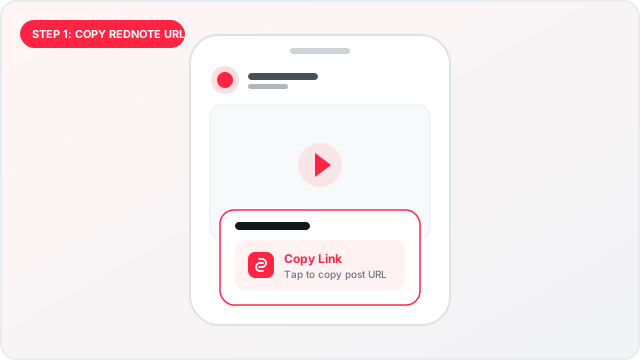
Step 1: Copy Xiaohongshu link from app
1

Copy the Post Link

Open the RedNote or Xiaohongshu app, find the video post you want to save, tap Share, and select Copy Link (supports both xhslink.com and xiaohongshu.com).

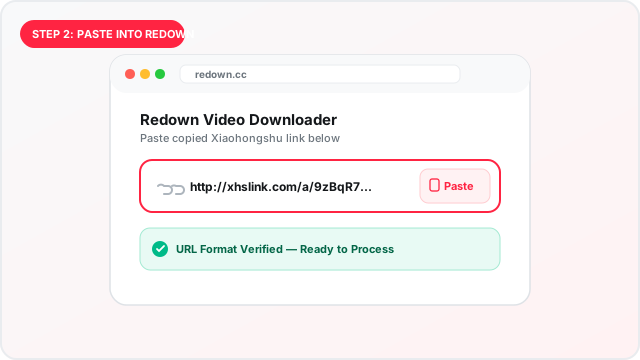
Step 2: Paste link into Redown
2

Paste into Redown

Open this online RedNote video downloader in your browser, tap Paste, or insert the copied link into the input box above.

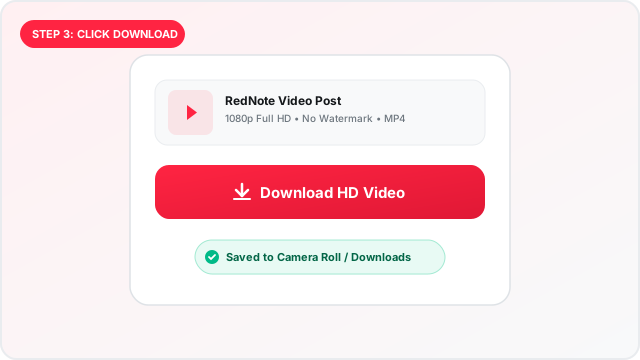
Step 3: Click Download to save RedNote media
3

Click Download

Click Download Video. Redown extracts the clean, unwatermarked MP4 video in 4K or 1080p HD ready for instant offline saving.

Supported Content

  • Public Video Posts: Clean MP4 videos without watermark in original 4K and 1080p HD resolution.
  • xhslink & Mobile Shortlinks: Full support for xhslink.com redirect links and raw xiaohongshu.com URLs.
  • Photo Collections & Covers: Full-resolution image notes, multi-photo carousels, and video thumbnail downloads.
  • Cross-Device Online Access: Direct web browser downloads on Android, iOS (iPhone/iPad), Mac, and Windows with no APK or app installation.

Unsupported Content

  • Private Posts: Content restricted to friends-only or private accounts cannot be accessed.
  • Deleted Content: Notes that have been removed by the creator or the platform.
  • Non-Post Pages: General profile pages, search result feeds, or user comment sections.
  • Region-Blocked Notes: Media restricted to specific geo-locations requiring platform authentication.

Built for Speed and Simplicity

A lightweight, privacy-conscious RedNote video downloader designed to work effortlessly across all platforms.

Download Without Watermark

Save clean Xiaohongshu videos without the floating app watermark, username logo, or closing brand animation.

Original 4K & 1080p HD Quality

Download videos in their original uploaded resolution and full audio bitrate with zero blurry re-encoding.

Photo Albums & Thumbnails

Download complete Xiaohongshu multi-photo galleries, uncompressed carousel slides, and video thumbnail covers.

Standard MP4 Video & MP3 Audio

Saves in universal MP4 format playable everywhere, plus standalone MP3 audio extraction for tutorials and music.

100% Free Online Downloader

No registration, login credentials, or daily download quotas required. Access the downloader anytime.

No App or APK Needed

Works directly in Safari, Chrome, Edge, and Firefox on Android, iPhone/iPad (iOS), Mac, and Windows PC — plus an optional 1-click Chrome Extension for desktop power users.

Redown vs. Other Xiaohongshu Downloaders

Compare Redown against generic web downloaders (such as DLPanda) and ad-heavy APK apps to see the difference in speed, quality, safety, and our 1-click Chrome Extension convenience.

Feature / Standard Redown (This Tool) Generic Tools (e.g. DLPanda) Android APKs & Mobile Apps
Watermark & Logo Removal 100% Clean MP4 Inconsistent Sometimes Removed
Browser Extension & In-Feed Download Official Chrome Extension (1-Click) Not Available Not Available
Ads & Popups Zero Intrusive Ads Heavy Banners & Popups Aggressive Video Ads
Software Installation 100% Web (Optional Chrome Ext) Web Only Requires Risky APK / App
iPhone & iPad (iOS) Support Native Safari Direct Clunky Mobile Web Not on App Store
Video Resolution Original 4K & 1080p HD Compressed 720p 720p / Variable
Daily Limits & Accounts Unlimited & No Login Daily Download Caps Paid In-App Coins
Want 1-Click Downloads Directly in Your Xiaohongshu Feed? Install the free Redown Chrome Extension for automatic URL detection, in-page download buttons, and dark mode.
Get Chrome Extension

All-in-One RedNote Video Downloader & Xiaohongshu Tool

Xiaohongshu (also known globally as RedNote) features millions of lifestyle guides, fashion trends, travel vlogs, and tutorials. Redown provides a unified suite combining our high-speed web-based RedNote video downloader and our official Chrome Extension designed to save public media in original quality with zero friction:

Xiaohongshu Video Downloader Without Watermark

When you download videos inside the official app, a floating username watermark and ending outro card are stamped onto the footage. Redown retrieves the clean, original MP4 video stream directly from the content distribution network before watermarks are added, preserving pristine 4K and 1080p video quality.

RedNote Photo & Thumbnail Downloader

Xiaohongshu creators frequently share multi-picture photo carousels and Live Photos. Redown extracts every image in the set at its native uncompressed JPEG or PNG resolution with zero watermarks, plus high-definition video cover thumbnails.

RedNote Video Transcript & MP3 Audio

Extract clear 320kbps MP3 audio tracks and written subtitles from spoken Xiaohongshu video notes. Ideal for language learners studying Mandarin Chinese, researchers transcribing recipes and reviews, or content creators reviewing tutorials.

1-Click Chrome Extension & In-Feed Tool

Save content directly while browsing without copying and pasting URLs. The official Redown Chrome Extension embeds instant watermark-free download buttons directly beside like buttons on Xiaohongshu feeds, featuring auto post URL detection, light/dark themes, and zero tracking.

How to Download RedNote Videos on Android, iOS & PC

Follow these step-by-step instructions to save Xiaohongshu videos without watermark on iPhone (iOS), Android, and desktop computers.

iPhone & iPad (iOS)

Safari Browser Direct
  1. In the Xiaohongshu / RedNote app, tap the Share icon and select Copy Link.
  2. Open Safari, visit Redown, tap Paste, and click Download.
  3. Tap the download manager icon in Safari's address bar to view the downloaded MP4 video.
  4. Tap the iOS Share button and choose Save Video to store it directly in your Camera Roll / Photos app.

Android Devices

Chrome, Firefox & Samsung
  1. Open the RedNote app, find the video or photo note, tap Share > Copy Link.
  2. Launch Google Chrome or your default mobile browser and visit Redown (no APK install needed).
  3. Paste your copied link into the input field and tap Download.
  4. The clean MP4 file downloads immediately into your device Downloads folder and appears in Google Photos or your Gallery app.

Mac & Windows PC

Chrome, Edge & Safari
  1. Copy the post link from the Xiaohongshu website or your desktop browser.
  2. Open Redown, paste the URL into the input field, and click Download.
  3. The original 4K or 1080p HD video saves straight to your computer's Downloads folder.
  4. Files are ready for offline viewing or importing into video editors like CapCut or Premiere.
Mobile Shortlink http://xhslink.com/a/ABC123xyz

Standard mobile share link created when you tap Share > Copy Link inside the official RedNote / Xiaohongshu app. Redown resolves redirects automatically.

Desktop Exploration URL https://www.xiaohongshu.com/explore/64a1b2c3d...

Standard desktop web address when browsing Xiaohongshu post pages on a laptop or desktop computer.

Discovery Post Link https://www.xiaohongshu.com/discovery/item/64a1b...

Direct discovery item URL format shared from creator web profiles and external search engines.

Smart Auto-Extraction 72 复制打开小红书查看 http://xhslink.com/...

No need to manually delete Chinese characters or emojis! Simply paste the entire copied mobile text — Redown's smart parser isolates the clean URL automatically.

Basic Troubleshooting & Solutions

Fast answers to the most common questions when saving RedNote videos and photo galleries.

Why does the downloaded video have no sound?

If a video downloads without sound, it is usually because the creator posted it without an audio stream, or because Xiaohongshu restricted copyrighted background music for playback outside mainland China. Redown always preserves the exact source audio track provided with the post.

Why do I get an "Invalid URL" error?

Make sure you copied a link to an individual video or photo post, not a creator's profile page, feed stream, or search results page. Verify the link starts with http:// or https:// and contains xhslink.com or xiaohongshu.com.

Why can't I download a specific note?

Redown can only access publicly available posts. If the creator has marked their note as private (friends-only), if the content was removed by the platform, or if the note requires login verification, it cannot be downloaded.

How are photo carousels and Live Photos handled?

Multi-picture gallery notes are prepared as original high-resolution JPG or PNG images. For Xiaohongshu Live Photos, content can be downloaded as crisp still images or standard looping MP4 video clips.

Falak Sher - Creator of Redown

Falak Sher

Creator & Web Developer @falaksher1990

Hi, I'm Falak Sher, the creator of Redown and an experienced web developer passionate about crafting fast, privacy-focused web tools. I engineered Redown to provide an effortless, watermark-free media utility for the global RedNote community without intrusive ads or bloat.

⚡ Ultra Fast 🔒 Zero Data Logs 🚫 100% Secure

Common Questions & Answers

Quick answers about using Redown.

Yes. You can download public videos from Xiaohongshu (RedNote) using Redown. Simply copy the post link or xhslink from the app, paste it into the search box above, and click Download to save the clean MP4 video file directly to your phone or computer.
To download a Xiaohongshu video without watermark: 1. In the RedNote or Xiaohongshu app, tap Share and select Copy Link. 2. Open Redown in your browser and paste the link into the input field. 3. Click Download. Redown fetches the original unwatermarked stream directly from the content distribution servers before watermarks are added, saving clean 1080p or 4K MP4 video.
Yes. Redown functions as a dedicated xhslink video downloader. When you copy a mobile share link (such as http://xhslink.com/...), Redown automatically expands the shortlink, cleans any accompanying Chinese text, and extracts the clean, unwatermarked media.
Yes. Switch to the 'Photo / Album' tab, paste the post URL, and Redown extracts every image from the photo collection in original full-resolution JPEG or PNG format without watermarks. You can also download high-resolution video thumbnail covers.
Yes. Switch to the 'Audio / Transcript' tab to extract the standalone 320kbps MP3 audio stream and spoken text transcripts from video notes.
No installation is required. You do not need any third-party APK, mobile app, or browser extension. Redown operates 100% inside your standard web browser across iOS, Android, Mac, and Windows.
No. Redown is an independent third-party utility tool and has no official affiliation or partnership with RedNote or Xiaohongshu.